
aeroTechLog

Digital aircraft technical log
One defect record. From the pilot's write-up to the release to service.
AeroTechLog is the paperless aircraft technical log from SkyDynamics. The crew writes up a defect, maintenance rectifies or defers it, and the CAMO sees the same entry. It works offline, in the cloud or on your own servers.
- Crew to CAMO
- One defect record, end to end
- Offline
- Works on the ramp without connectivity
- MEL
- Deferrals tracked against the MEL
- Audit trail
- Every entry attributable and timestamped
How it works
Written once. Read by the crew, maintenance and the CAMO.
AeroTechLog replaces the paper technical log and the journey log with one electronic record. It holds the flight crew entries, defect management, tracking against the Minimum Equipment List (MEL) and the Configuration Deviation List (CDL), and the link to the maintenance records.
The crew writes up the defect
On the tablet, at the aircraft, with or without a connection. AeroBrain suggests the MEL reference as the entry is typed.
Maintenance rectifies or defers
The entry opens a rectification workflow. A deferral is tracked against the MEL, and the commander and the certifying staff decide it.
The CAMO sees the same record
The entry syncs to every department in real time. The continuing airworthiness management organisation (CAMO) reads what the crew wrote, attributable and timestamped.
Aircraft start page
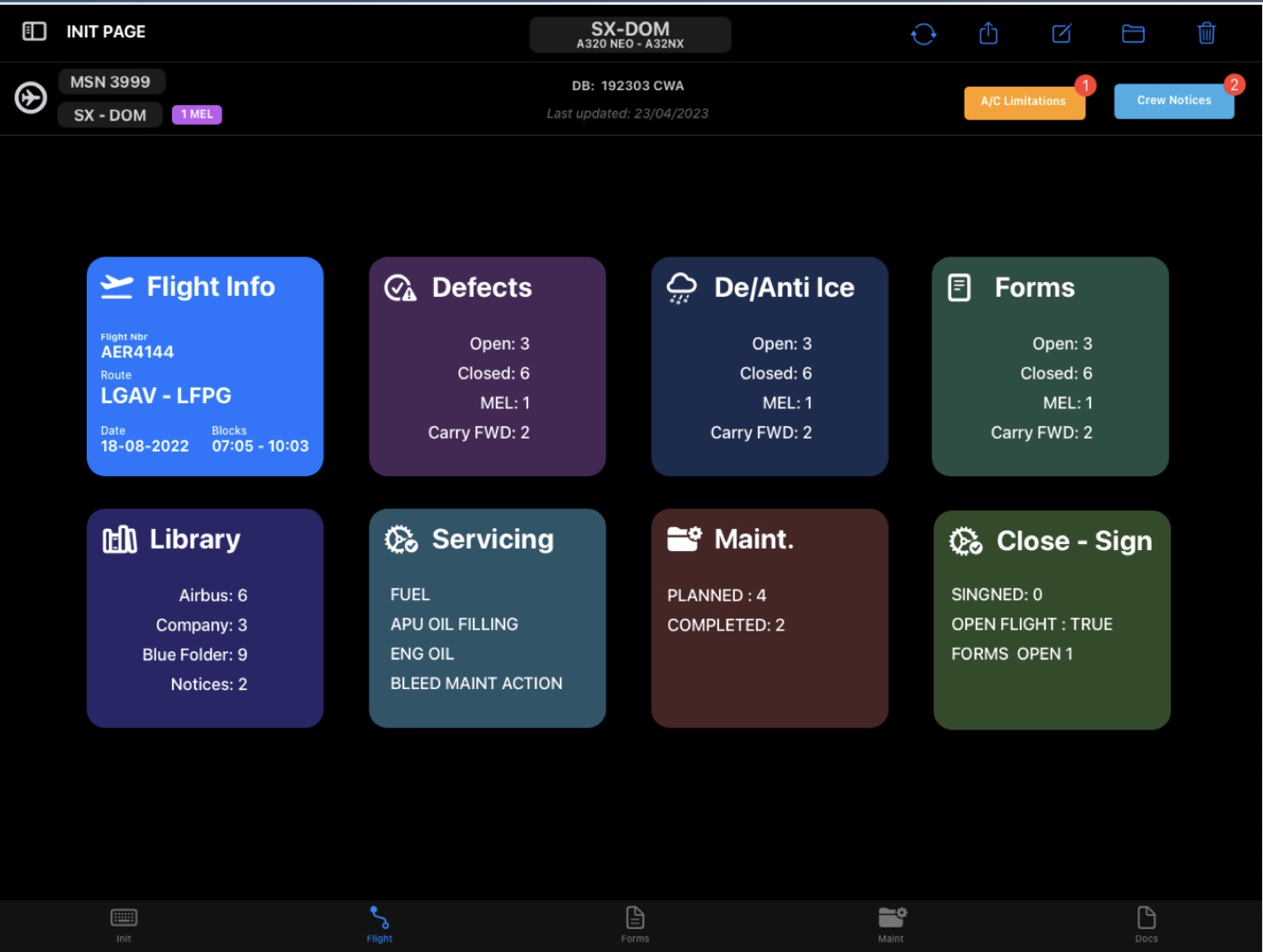
One page per aircraft. Defects, MEL items, forms and servicing on the first screen.
The start page shows one aircraft at a glance: the flight, open and closed defects, MEL and carried-forward items, forms, servicing and maintenance. Each function is one tap away.
- A fleet-wide view of defects, MEL items and aircraft availability, in real time
- Quick access to every function
- Dashboard widgets you can configure
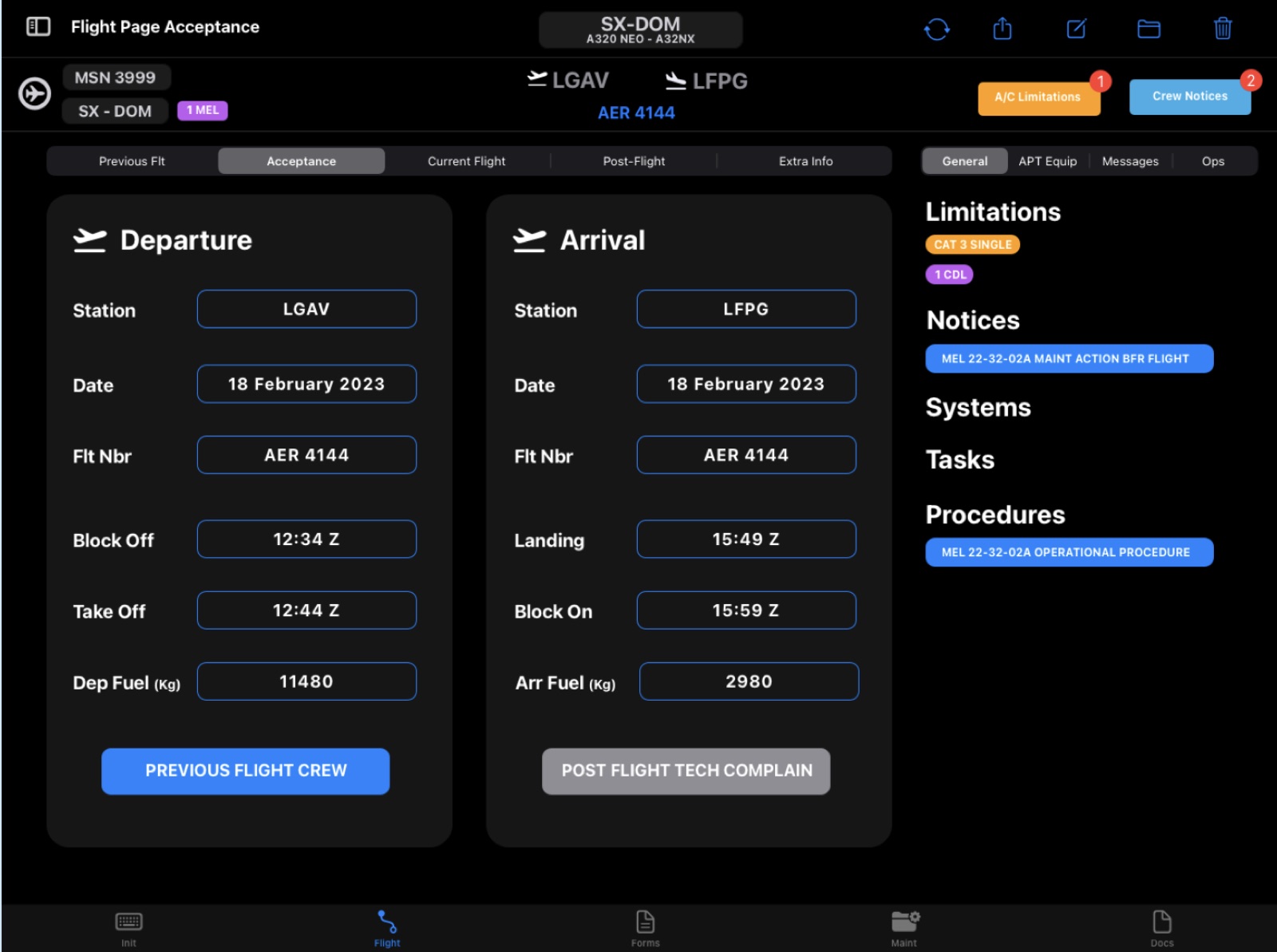
Flight acceptance
Open items at acceptance. Limitations, notices and MEL procedures in front of the crew.
When the crew accepts the aircraft, the flight page lists what is open on it: the limitations, the notices and the MEL procedures that apply. A defect found after the flight is written up from the same page.
- A rectification workflow opened for each defect
- Deferrals tracked against the MEL
- An audit trail of every entry
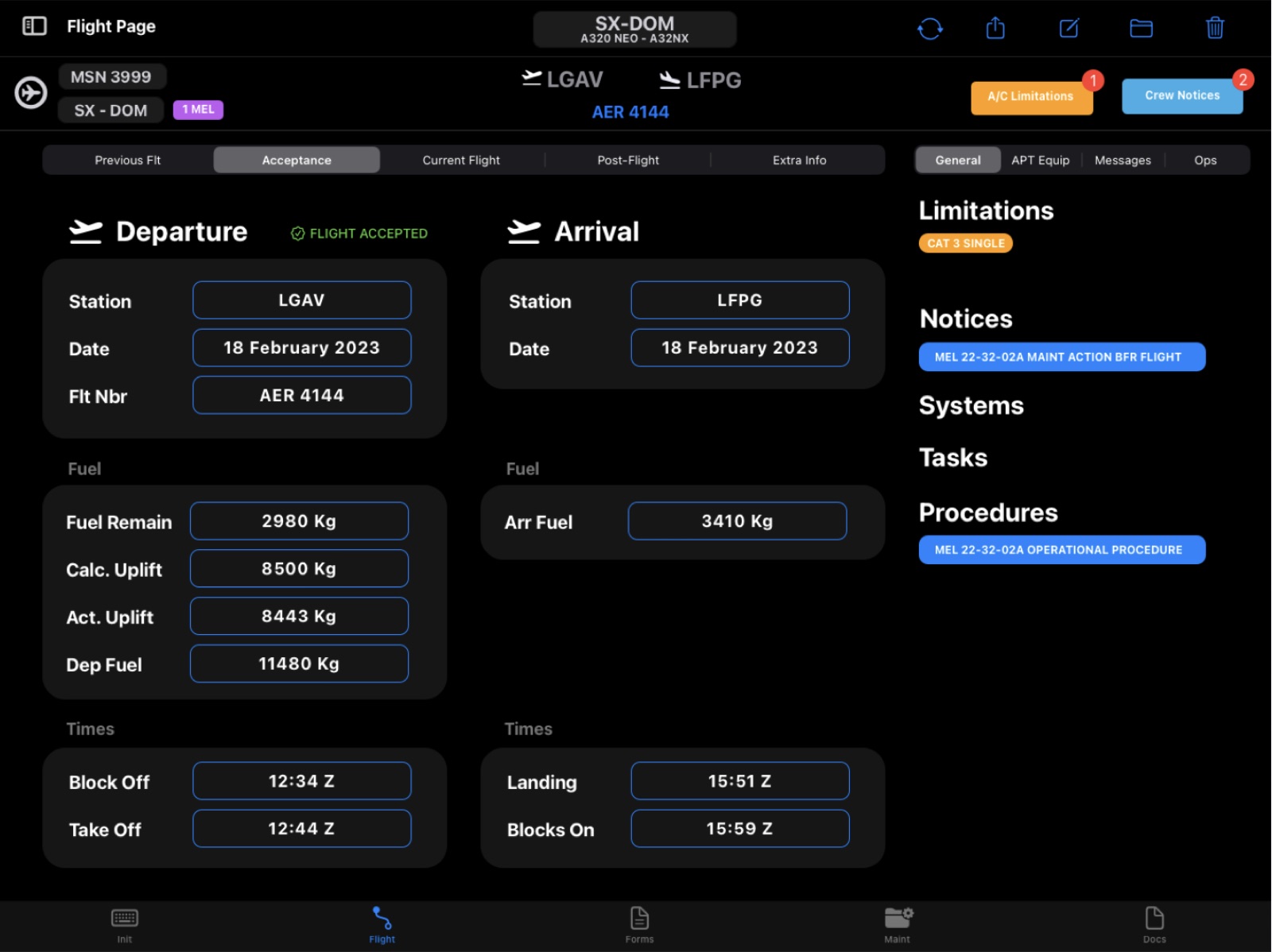
Journey log
The journey log, without paper. Fuel, times and crew signatures for every sector.
Each sector is captured as it is flown: fuel remaining, uplift, departure and arrival fuel, and the block and flight times. The crew signs on the tablet.
- Automated time calculations
- Digital crew signatures
- Fuel and oil tracking
Approval
No software is approved. Authorities approve organisations and their procedures.
A technical log forms part of the operator's procedures. AeroTechLog is built to the requirements of EASA, ICAO and FAA rules for electronic technical logs, so that it can take its place in those procedures.
People decide
The commander and the certifying staff decide each deferral. AeroBrain only suggests the MEL reference.
Every entry is attributable
Each entry carries who made it and when, and deferrals are tracked against the MEL.
Personal signatures
Each user signs with a personal signature credential, which gives non-repudiation and an audit trail.
Features
Works where the aircraft is. Offline, between iPads, in the cloud or on your own servers.
Offline at the aircraft
Crew members make entries and read aircraft data without a connection. The data synchronises when the connection returns.
iPad to iPad
Company iPads sync directly with each other, without internet: for remote airfields, high-security areas and anywhere without connectivity.
Your servers or the cloud
Host AeroTechLog on your own servers and the data stays inside your airline's infrastructure, or run it in the cloud.
One set of data
Pilots, maintenance, operations and management see the same live data, with reporting and trend analysis across the fleet.
AeroBrain suggestions
AeroBrain analyses defects and suggests the MEL reference as you type. The decision stays with the commander and the certifying staff.
Alerts on your phone
The Flying Whale app sends push notifications about your flights and aircraft defects.
Getting started
Your fleet, your MEL. Loaded during onboarding, with the integrations you ask for.
Implementation depends on fleet size and on the integrations you need. Typical implementations take 4 to 12 weeks, including data migration, integration setup, training and the approval process with your authority.
- Your own MEL
- The MEL belongs to the operator and is approved for it. Your own MEL is loaded during onboarding.
- Integrations
- Connections to your maintenance, flight operations and crew management systems are made through the API, on request.
- Devices
- Tablets, laptops and desktop computers through a modern web browser, with mobile apps for iOS and Android for offline use.
Frequently asked questions
What is AeroTechLog?
AeroTechLog is a digital aircraft technical log. It replaces the paper technical log and the journey log with one electronic record that holds the flight crew entries, defect management, MEL and CDL tracking, and the link to the maintenance records.
Is AeroTechLog approved by EASA?
No software is. Authorities approve organisations and their procedures; a technical log forms part of those procedures. AeroTechLog is built to the requirements of EASA, ICAO and FAA rules for electronic technical logs.
Can AeroTechLog work offline?
Yes. Crew members can make entries and read aircraft data without an internet connection. The data synchronises when a connection is restored. Company iPads can also sync directly with each other.
How does AeroTechLog handle digital signatures?
Each user signs with a personal signature credential, so every entry is attributable and timestamped, with non-repudiation and an audit trail. The use of electronic signatures is part of the operator's procedures, which its authority approves.
Can AeroTechLog integrate with our existing systems?
Yes, through the API, on request. Tell us which maintenance, flight operations and crew management systems you run, and we will confirm what can be connected.
How is data security handled?
Data is encrypted at rest and in transit. Access uses multi-factor authentication and role-based access control, and the system has regular security audits. Our information security management is aligned with ISO 27001. AeroTechLog can also run on your own servers.
What devices are supported?
AeroTechLog works on tablets, laptops and desktop computers through a modern web browser. Mobile apps for iOS and Android add offline use.
How long does implementation take?
It depends on fleet size and on the integrations you need. Typical implementations take 4 to 12 weeks, including data migration, integration setup, training and the approval process with your authority.
Leave the paper log behind. See one defect record move from the crew to the CAMO.
Book a demo of AeroTechLog. Tell us your fleet and the systems you run today.